
Creating a consistent look for the forms of an application can be a challenging task, especially when the application is quite large. form.suite4.net provides stylesheets as a means to ease the tedium connected with re-creating formatting across different forms, but it also offers another alternative — form inheritance.
Using the Form Manager, you can easily create inherited forms by right-clicking on any existing form in the Project Explorer and selecting "Inherited Form" in the context menu. A new form is added to the project, which inherits all controls and properties from the base form. It can be freely modified in the Form Designer just like the base form.
When you generate the code for the RootForm and its inherited form(s) after the design process is completed, the following changes occur:
private to protected. This allows access to the controls in the parent form from any child form. Initialize Component in the child forms contains merely the changes between the parent form and the child. Controls that remain unchanged between the parent and the child are not initialized again. 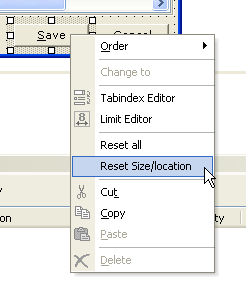 If you work in an inherited form in the Form Designer, you have the option to undo all or only a subset of the changes you made to any given control. This is achieved by right-clicking on the control and selecting "Reset all" or "Reset size/location" form the context menu.
In addition to the obvious benefits of using inheritance for achieving a consistent visual layout across the forms of an application, there are two more applications you may want to consider:
Note: there is no technical limit to the levels of nested inheritance supported by form.suite4.net.