
 Note: additional information on the subject contained here can be obtained from an instructional video clip
  at the form.suite4.net web site.
Clipboard and Clipcontainer are repositories for controls and control groups that need to be used again later. Both support drag and drop and visually display their content so you can easily pick the elements you are looking for.
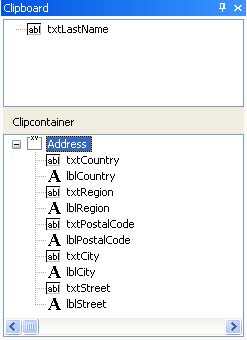 Clipboard: use CTRL+X (cut) or CTRL+C (copy) to place any form element in the Clipboard. Retrieve the content by dragging it onto a form or another control in the Form Designer window.
Note: as soon as you copy or cut another element to the Clipboard, any existing content will be overwritten.
Clipcontainer: if you want to keep a control or group of controls available across several cut and copy operations or even several editing sessions, drag them from the Form Designer window to the Clipcontainer. Its content is stored along with the current user's settings and will be available any time you open the program (this feature can be disabled in the program options if required). Retrieving the Clipcontainer's content is done by dragging the desired element or elements onto the form. Should you not need Clipcontainer items anymore, select them and press the DEL key. This removes them permanently.