
 Note: additional information on the subject contained here can be obtained from an instructional video clip
  at the form.suite4.net web site.
The QuickProperties Editor provides an alternative to the Property Grid. While both perform essentially the same function — allowing you to modify properties of forms or controls — the QuickProperties Editor contains only the most relevant properties that you are most likely to use during day-to-day form design tasks.
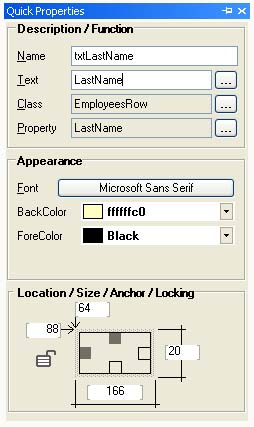 Here you can conveniently set the name of a control, manage the linkage of the control to a business class property and modify its appearance, size or locking settings.
Depending on the settings in the program options, you can have the QuickProperties Editor automatically assign a name to the control based on the value entered in the "Text" input field. This way, if you enter "LastName" as the "Text" value of a TextBox control, the "Name" property is set to "txtLastName". If the control already contains a value in the "Text" input field, you can double-click on the field to have the name adjusted in the same way.
Please note that this function is disabled by default and has to be enabled in the program options first. To do this go to the main menu, choose and activate the checkbox.